If you keep coming across StackR or stackr.world in the VeVe community, you’re not alone. For many collectors, it initially looks like a mix of a marketplace, wallet, OMI tool, and a few security question marks.
In short: StackR is a separate platform connected to VeVe that provides OMI-based features. Among other things, VeVe users can trade collectibles for OMI and convert OMI into Gems. You do not need StackR for standard VeVe purchases with Gems. It mainly becomes relevant if you want to use OMI.

TL;DR: StackR adds a separate OMI marketplace and wallet to the VeVe ecosystem. OMI can be used there to buy collectibles or Gems; converting Gems back into OMI is not supported. Use official access points only, verify the wallet address and network before every transaction, and remember that blockchain transactions cannot easily be reversed.
What Is StackR in the VeVe Ecosystem?
VeVe launched its StackR integration on April 28, 2025. Since then, StackR has provided an additional marketplace where connected VeVe collectibles can be bought and sold with OMI.
The distinction matters: VeVe remains the familiar collecting platform with its app, Store, Market, and Gems. StackR is a connected but independent platform with marketplace, wallet, and OMI features. It is not simply “VeVe with a different design.”
Your VeVe account connects to StackR so eligible collectibles can appear and be listed within the StackR environment. Wallet actions and OMI transactions, however, take place within a separate structure. This gives users more personal responsibility than a standard Gem purchase within VeVe.
What Do VeVe Users Need StackR For?
StackR is primarily designed for these three use cases:
- Trading VeVe collectibles for OMI: Eligible collectibles can be bought or sold for OMI on StackR.
- Using OMI in a StackR wallet: OMI held in the StackR wallet can be used for marketplace activity and other supported wallet features.
- Converting OMI into Gems: Since November 19, 2025, OMI can be converted through StackR into the corresponding USD value in Gems.
StackR therefore provides an additional OMI route within the VeVe ecosystem, but it is not required for every collector. If you only buy Gems through VeVe and trade collectibles on the VeVe Market, you can continue using VeVe without a StackR workflow.
For a general introduction to the token, see our OMI token guide. This article, meanwhile, remains the main overview of how StackR and VeVe work together in practice.
How Do OMI and Gems Relate to StackR?
OMI is a blockchain token associated with the ECOMI and VeVe ecosystem. Gems, by contrast, are VeVe’s non-transferable, non-withdrawable in-app currency used to buy collectibles and comics in the Store or Market.
Since November 19, 2025, users have been able to use OMI for Gems through StackR. This process only works in one direction: OMI to Gems is supported; Gems to OMI is not. Collectors who want to buy Gems normally through the VeVe app or website do not need to acquire OMI.
Our separate guide to converting OMI into Gems through StackR covers the individual requirements, confirmations, and verification steps. That allows this article to remain an overview without repeating the entire transaction process.
Is StackR Integrated Directly Into VeVe?
StackR is connected to VeVe, but it is not part of the same app interface. You sign in to StackR separately and connect your VeVe account there. Supported collectibles and account information can then be synchronized.
This separation explains many common misunderstandings: A collectible can be linked to your VeVe account while your OMI is held in a separate StackR wallet. Display or synchronization delays therefore do not automatically mean an asset has been lost.
Do You Need a Wallet for StackR?
For standard VeVe use: not necessarily. If you buy Gems normally and collect only within VeVe, you do not need a StackR wallet.
For OMI-based StackR actions, however, the wallet is central. StackR describes the ECOMI/VeVe web wallet as custodial and the StackR wallet created automatically for a StackR account as self-custodial. The current technical implementation uses Privy Smart Accounts. Among other things, this means the visible smart account address and the exportable key structure should not be treated as equivalent to a basic standard wallet.
If this distinction is new to you, read our article on custody and self-custody before making any transfers. With self-custody, you take on greater responsibility for keys, destination addresses, networks, and approvals.
How Do You Get Started With StackR?
The basic process involves signing up, linking your VeVe account, checking your wallet, and completing the desired OMI action. The exact interface and individual confirmation steps may change.

- Define your goal: Do you want to trade collectibles for OMI, convert OMI into Gems, or simply explore StackR?
- Use the official access point: Open StackR only through a verified address, not through DMs, search ads, or unfamiliar shortened links.
- Connect your VeVe account: Carefully check which connection and sign-in request you are confirming.
- Verify the wallet and network: Before every transaction, make sure you know where your OMI is held and which network the destination supports.
For complete account setup and security preparation, see our separate guide to setting up StackR and VeVe securely. This overview is intentionally not a step-by-step guide.
Which Networks and Migration Limitations Matter?
StackR uses the Base network for key wallet and marketplace features. Depending on where it is held, OMI may also be on Ethereum L1. Although the same EVM address can be used across multiple networks, that does not mean the assets are automatically on the same network.
According to the current StackR Wallet FAQ, the previous option to migrate OMI directly from the VeVe/ECOMI web wallet using the StackR migration tool is no longer available. If OMI is still held in the VeVe wallet, users are instructed to contact official VeVe Support. Further transfers or a potential move to Base can be considered only once the OMI is available at an address the user controls.
This limitation is important: Do not send OMI to an address based on guesswork, and do not assume that linking your VeVe account automatically moves all tokens into the StackR wallet.
What Fees Can Apply When Using StackR?
Network or gas fees may apply to deposits and withdrawals. According to VeVe, StackR does not charge an additional platform fee for these transactions. Actual network costs may still vary depending on blockchain activity and the action being performed.
Transaction fees also apply when buying or selling collectibles. According to official information, these may depend in part on the applicable licensor. Check the details for the collectible on the listing or confirmation page before completing the transaction.
Never assume that fees will always be zero, and do not rely on old screenshots or sample calculations. For a broader overview, see our article on VeVe fees and costs.
Security Limits: What to Check Before Every StackR Action
StackR adds wallet, network, and token steps to the standard VeVe experience. As a result, mistakes may be harder to correct. Neither VeVe Support nor StackR Support needs your private key.
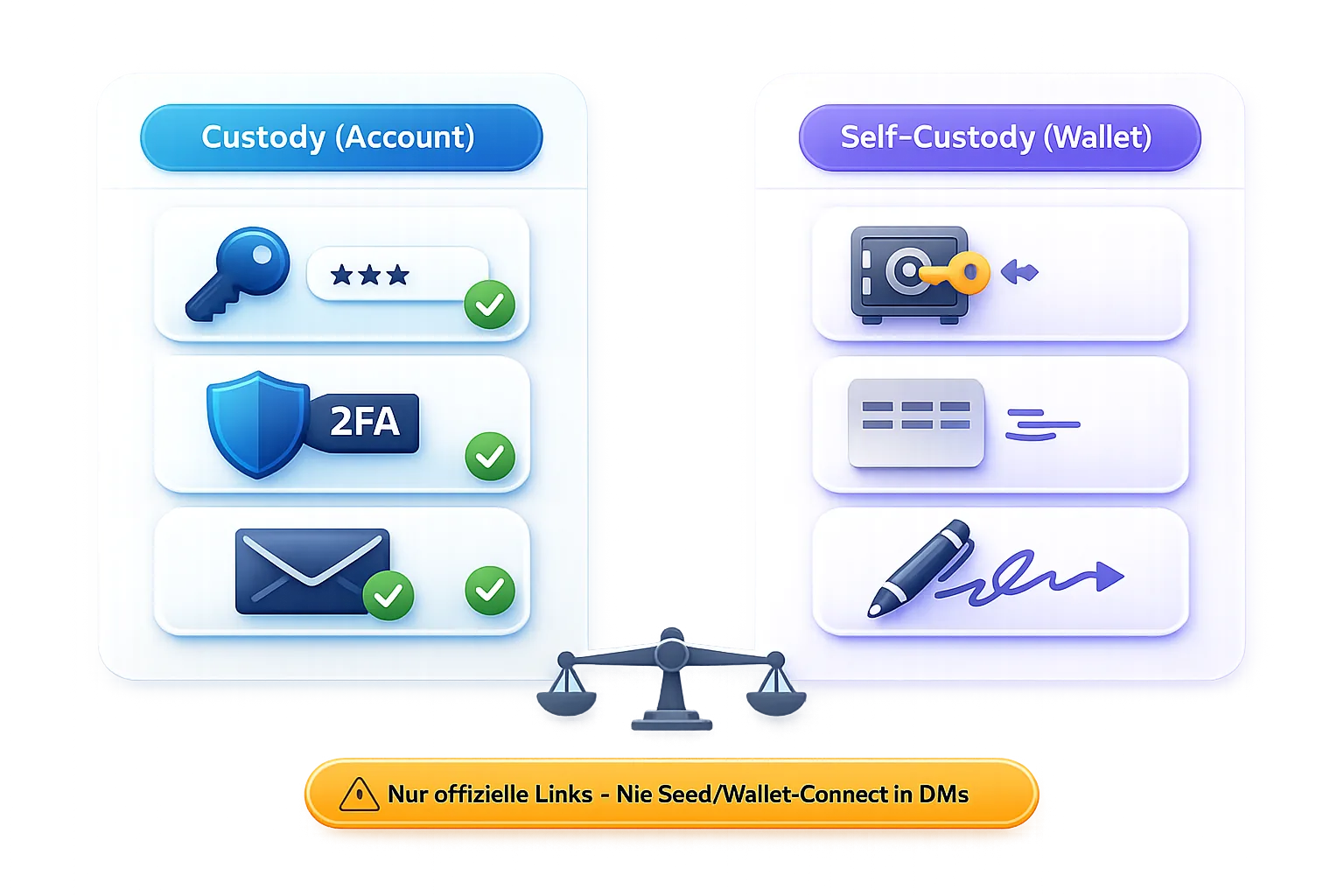

- Use official links only: Do not open StackR or support pages through unsolicited messages.
- Secure your 2FA and email account: The security of the connected email account is an important part of protecting access.
- Never share private keys or recovery information: Do not provide them to anyone claiming to be a support representative or community account.
- Verify the token, address, and network: A visually correct address is not enough if the wrong network is selected.
- Use a small test amount for a new transfer route: First confirm that the destination and network work as expected.
- Read confirmations in full: Check the amount, destination, and fees before approving the transaction.
- Stop if you are unsure: A missed transaction is usually less problematic than a permanently misdirected transfer.
For basic account security without prior OMI knowledge, see our VeVe beginner’s guide.
Common Misunderstandings About StackR
- “Every VeVe user needs StackR.” No. StackR is primarily relevant for OMI-based features.
- “StackR is just the VeVe Market under a different name.” No. The platforms are connected, but they use different currencies, wallet structures, and processes.
- “Gems can be converted back into OMI through StackR.” No. The officially supported route goes from OMI to Gems, not the other way around.
- “OMI in the VeVe wallet automatically appears in StackR.” No. Linking an account and transferring tokens are separate processes.
- “Self-custody means support can reverse any mistake.” No. Blockchain transfers sent to the wrong address or network may create permanent problems.
- “StackR is automatically the best option for every sale.” Not necessarily. The VeVe Market and StackR use different currencies and may have different prices, fees, and liquidity.
FAQ
What Is StackR in Simple Terms?
StackR is a separate platform connected to VeVe where eligible VeVe collectibles can be traded with OMI and supported wallet features can be used.
Do I Need StackR for Standard VeVe Purchases?
No. You can continue buying Gems through the usual VeVe purchase methods and spending them in the VeVe Store or Market.
Can I Convert OMI Into Gems Through StackR?
Yes. This feature has been available since November 19, 2025. The Gems can then be used in VeVe, but they cannot be converted back into OMI.
Can I Sell a VeVe Collectible on StackR?
Supported collectibles synchronized with your connected VeVe account can generally be listed for OMI on StackR. A completed VeVe KYC status may be required to sell.
Which Wallet Do I Need for StackR?
OMI-based StackR features use the wallet associated with your StackR account. Before making a transfer, always check whether your OMI is on Base, Ethereum, or still in a VeVe/ECOMI wallet.
Does StackR Allow You to Cash Out Gems?
No. StackR does not make Gems withdrawable. It is a separate OMI route that allows collectibles to be traded for OMI. Our article on VeVe payouts and the new Gem rules explains the limitations in effect since November 19, 2025.
What Should I Do if My OMI or a Collectible Is Not Showing?
First, check that you are signed in to the correct account, viewing the correct wallet, and using the expected network. Allow for potential synchronization or blockchain delays. If the issue persists, use official support only and have your wallet address, transaction hash, amount, and screenshots ready.
Ultimately, StackR is most useful when you intentionally want to use the OMI route within the VeVe ecosystem. Clearly distinguishing between VeVe, StackR, Gems, OMI, and the wallets involved can significantly reduce common user and security errors.
New to VeVe? If you sign up through our affiliate link (at no additional cost to you), the current welcome credit guide states that you will receive $10 in free welcome credit.
Review the details and terms in the welcome credit guide
Sign up for VeVe with welcome credit
Disclosure: Affiliate link (we may receive a commission at no additional cost to you.)